Case Study: How Eagle 3D Streaming Enabled Anythink Libraries to Build a Multiplayer Educational Metaverse
How Eagle 3D Streaming helped Anythink Libraries build a browser-based, multiplayer educational metaverse using Unreal Engine and automated Pixel Streaming.
 MD Rafshan Tashin Eshan
January 5, 2026
8 min read
Case Study: How Eagle 3D Streaming Enabled Anythink Libraries to Build a Multiplayer Educational Metaverse
Overview
Public libraries are redefining what community engagement looks like in a digital-first world. Anythink Libraries, serving Adams County, Colorado, partnered with Eagle 3D Streaming to create Anythink World—a browser-based, multiplayer virtual environment designed to bring education, creativity, and community together online.
Built using Unreal Engine and delivered through Eagle 3D Streaming’s Pixel Streaming infrastructure, Anythink World provides high-fidelity, real-time interaction without requiring users to own high-end gaming hardware.
The Challenge: Moving Beyond Zoom Fatigue
When physical library branches closed during the pandemic, Anythink Libraries faced a challenge shared by many public institutions: how to stay meaningfully connected with their community in a fully online world.
Standard video conferencing tools allowed programs to continue, but they lacked immersion, presence, and social connection.
As Alex Tao, Anything World Manager at Anythink Libraries, explained:
“Zoom fatigue is a real thing. We wanted to break out of that Zoom box and give people a space where they could truly connect and gather online.”
The goal was not to replicate in-person programs through video calls, but to create a shared digital space that felt alive.
The Vision: Meeting Communities Where They Are
Anythink Libraries recognized that people were already spending time in online, interactive, and gaming environments. Instead of asking users to adapt to static digital tools, the library chose to meet them where they already were.
“We understand that people are already spending time in online and gaming spaces, so as a library, we wanted to meet our customers where they are.”
— Alex Tao
The result was Anythink World, an umbrella platform designed to host multiple immersive experiences that align with the library’s mission of education, creativity, and accessibility.
“We wanted to create a space dedicated to education, creativity, and accessibility—something that felt alive, not just another video call.”
Anythink World: A Multi-Experience Digital Platform
Anythink World launched with three distinct experiences, each designed to serve a different purpose:
- The Island, a social exploration space where users can gather and interact
- The Campus, built for workshops, meetings, and educational programming
- Main Street, a narrative-driven poetry experience inspired by a digital twin of downtown Brighton, Colorado, featuring the work of Poet Laureate Carrie Joy
Together, these environments create a flexible digital ecosystem that supports both structured programming and open-ended exploration.
The Solution: Eagle 3D Streaming Pixel Streaming Infrastructure
Seamless Multiplayer Experiences
Multiplayer interaction was a foundational requirement. Users needed to explore spaces together, hear shared audio, and experience interactions in sync.
“When you’re designing something to be experienced by multiple people, it adds a lot of layers—you have to think about network replication and shared interactions.”
— Alex Tao
Eagle 3D Streaming provided the multiplayer backbone that ensured consistency across sessions, allowing users to join the same space and experience it together.
“It’s always more engaging when people can enter the space together, explore with friends, and experience things at the same time.”
Simplified Deployment with the Eagle Plug-in
Deploying Unreal Engine Pixel Streaming projects traditionally requires complex server setup and dependency management. Eagle 3D Streaming’s custom Unreal Engine plugin removed that friction, allowing the Anythink team to focus on creativity instead of infrastructure.
“Once the project was set up, it was really just a matter of focusing on the creative vision and pushing updates.”
— Alex Tao
E3DS Automation Tools: One-Click Packaging, Compression, and Deployment
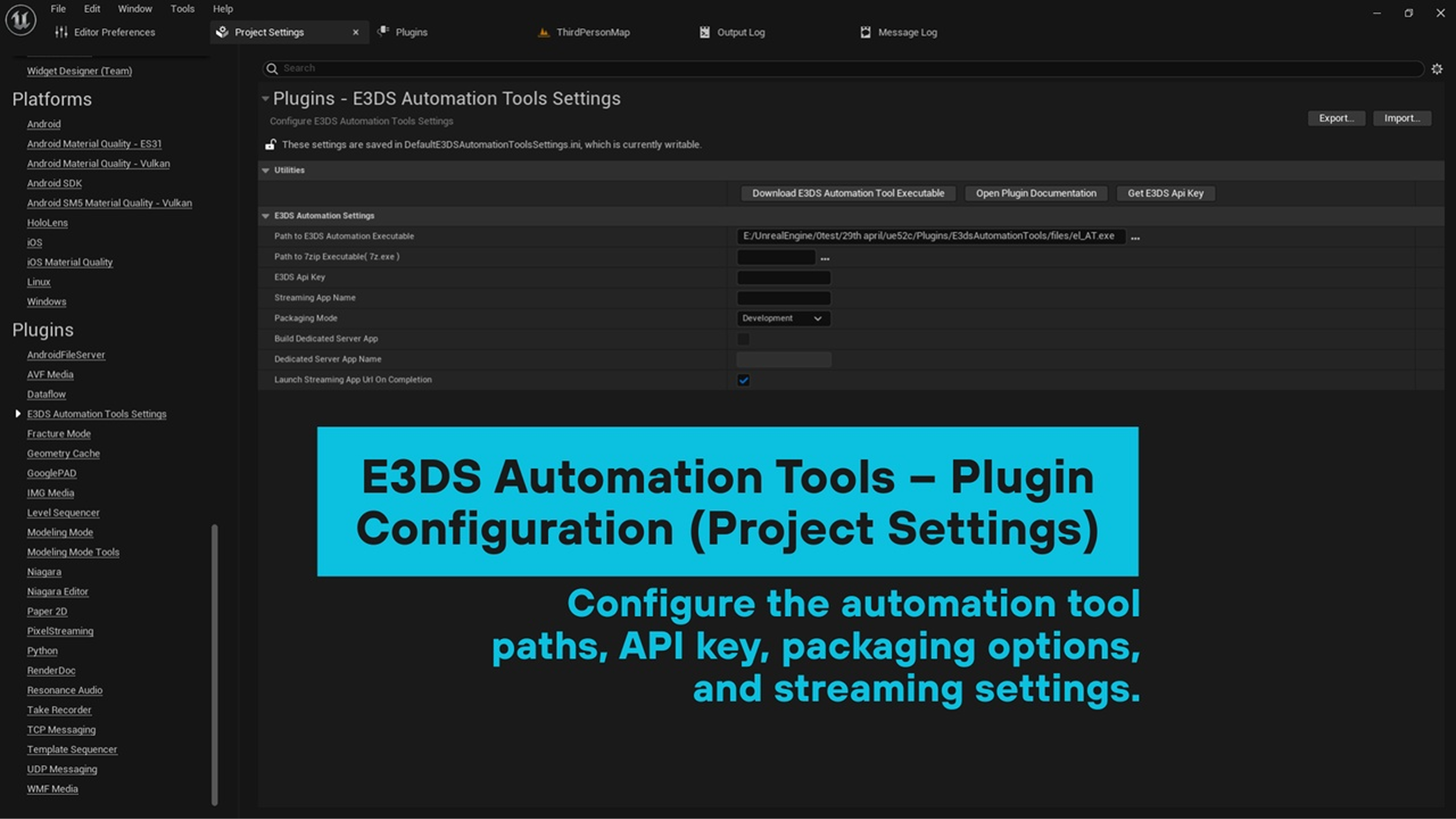
A critical component of Anythink’s workflow was Eagle 3D Streaming’s E3DS Automation Tools. Using the Automation Plugin, the team could package their Unreal Engine project, automatically compress the build using 7-Zip, and upload it directly to the Eagle 3D Streaming platform—all with a single click.
“Using Eagle’s automation tools was really simple—once everything was set up, it was just a single-click push to deploy and update.”
— Alex Tao
This automated pipeline eliminated repetitive manual steps and ensured consistent deployments.
“If we needed to make a small change, like updating music or content, we could push it instantly. That simplicity was huge for us.”
By removing deployment overhead, the Anythink team could iterate faster and focus entirely on experience design.
How to Use the E3DS Automation Tools
Getting started with the E3DS Automation Tools in Unreal Engine is straightforward and designed to keep the deployment process fully automated and efficient. This workflow allows teams to package, compress, and upload Unreal Engine Pixel Streaming projects with minimal manual effort.
Step 1: Enable the E3DS Automation Tools Plugin
In Unreal Engine, navigate to:
Edit > Plugins > E3DS Automation Tools
Enable the plugin and restart the Unreal Editor to apply the changes.
You can download the plugin here:
E3DS Automation Tool Plugin: https://www.fab.com/listings/ce940458-a89d-4900-81ba-3ac1e2254832
Step 2: Enable the Pixel Streaming Plugin
Ensure the Pixel Streaming plugin is enabled, as it is required for the E3DS Automation Tools to function correctly with Unreal Engine Pixel Streaming projects.
Step 3: Configure the Plugin Settings
Go to:
Edit > Project Settings > E3DS Automation Tools Settings
Fill in the following required fields:
Path to E3DS Automation Executable
Select the downloaded E3DS Automation Tool executable file (EL*.exe).
Path to 7-Zip Executable
Provide the path to your 7-Zip executable file. The default location is usually:
C:\Program Files\7-Zip\7z.exe
7-Zip must be installed separately:
7-Zip (Compression Utility): https://www.7-zip.org
E3DS API Key
Enter your API key from the Eagle 3D Streaming Control Panel:
https://controlpanel.eagle3dstreaming.com
The API key generator is built directly into the plugin for convenience.
Streaming App Name
Specify the name of the application you want to upload for Pixel Streaming.
Packaging Mode
Choose the appropriate build mode based on your needs:
- Development: Slower builds with visible logs
- Shipping: Faster builds optimized for deployment
Build Dedicated Server App (Optional)
Enable this option only if your project includes a dedicated server build.
This feature is supported for GitHub or source-built Unreal Engine versions.
Launch Streaming App URL on Completion (Optional)
Automatically opens the streaming session once packaging and upload are complete.
Compatibility
Supported Unreal Engine Versions
Unreal Engine 5.2 – 5.6
For Unreal Engine 5.0 or 5.1, download from GitHub:
https://github.com/e3ds-ue4/E3DSAutomationTools
Supported Target Platforms
Windows, Win32
Supported Development Platforms
Windows
Distribution Method
Plugin
Helpful Resources
- Unreal Engine 5.2 – 5.6
- E3DS API Key Generator: Built into the plugin
- Eagle 3D Streaming Control Panel: https://controlpanel.eagle3dstreaming.com
- Official Website: https://www.eagle3dstreaming.com
Once configured, the E3DS Automation Tools handle project packaging, high-efficiency 7-Zip compression, and cloud upload with a single click—allowing teams to deploy Unreal Engine Pixel Streaming projects quickly, reliably, and without manual intervention.
Immersive Communication and Self-Expression
To create a true sense of presence, Anythink World needed natural communication and personal identity. Eagle 3D Streaming enabled both through:
- Ready Player Me avatar customization, allowing users to express themselves visually
- Integrated VOIP, enabling real-time voice communication inside the 3D environment
“Communication and connection are core to what we do as a library, and it was critical that those carried over into the virtual space.”
— Alex Tao
These features transformed Anythink World into a living social environment rather than a passive digital experience.
Results: A Scalable and Accessible Digital Library
With Eagle 3D Streaming, Anythink Libraries delivered:
- High-fidelity Unreal Engine experiences accessible directly through a web browser
- Real-time multiplayer interaction without user-side hardware requirements
- A fully automated deployment and update pipeline
- A compelling alternative to traditional online programming
The Main Street experience stands out as a creative digital twin that blends real locations with artistic storytelling and immersive sound design.
“With Unreal Engine, you can design the world to look and feel however you want—and that creative freedom really shows in this experience.”
What’s Next
With the core infrastructure in place, Anythink Libraries is now focused on expanding Anythink World with new experiences and programs.
“Now that we’ve got the basic infrastructure, it’s just a matter of building out new experiences.”
— Alex Tao
Key Takeaway
This case study demonstrates how public institutions can use Unreal Engine and Pixel Streaming to create immersive, accessible digital spaces. By combining Eagle 3D Streaming’s multiplayer infrastructure with powerful automation tools, Anythink Libraries proved that high-end interactive experiences can be delivered at scale—without complexity.
If you want to know more about us you can communicate with us through these ways:
Create a New Account
See Eagle 3D Streaming’s pixel streaming technology in action. Create a new account and explore how our solution can elevate your visualization workflow using your own content or industry examples.
Download the Free Pixel Streaming Guide
Learn how to deliver real-time 3D experiences directly from the cloud. This free guide walks you through setup, optimization, and streaming best practices — tailored for visualization studios and developers.
Join Our Community & Stay Connected
Be part of the 3D innovation movement. Join our Discord to connect with creators and developers, or subscribe to our newsletter for expert insights, updates, and the latest in pixel streaming delivered straight to your inbox.


